Mobile
iGaming
UI Design
Figma Make
Prototyping
Design Systems
AI-Driven
Homepage Redesign
Adaptive Intelligence & User-Centric Personalization
How do you design a homepage that feels personal for millions of users, without feeling intrusive?
This project explores an AI-driven redesign for a leading sports betting platform, in which the interface adapts to each user's behaviour, history, and skill level in real time. Designed as part of a product design challenge. Client anonymised at my discretion.
How do you design a homepage that feels personal for millions of users — without feeling intrusive?
This project explores an AI-driven redesign for a leading sports betting platform, where the interface adapts to each user's behaviour, history and skill level in real time. Designed as part of a product design challenge. Client anonymised at my discretion.
Timeline
1 week · part-time
Platform & Client
Mobile · Confidential · Sports & Gaming
Type
Product Design Challenge
Tools
Figma · Figma Make · Figma Slides · Variables · Prototyping
Timeline
1 week · part-time
Type
Product Design Challenge
Platform & Client
Mobile · Confidential · Sports & Gaming
Tools
Figma · Figma Make · Figma Slides · Variables · Prototyping
Timeline
1 week · part-time
Type
Product Design Challenge
Platform & Client
Mobile · Confidential · Sports & Gaming
Tools
Figma · Figma Make · Figma Slides · Variables · Prototyping

72
72
Figma variables
Figma
variables
10
Smart components
4
Pain points resolved
2
Adaptive user tiers
Adaptative
user tiers
__
The problem
__
The problem
__
The problem
Four friction points killing engagement
Four friction points killing engagement
Benchmarking against leading iGaming and sports tech platforms revealed a consistent pattern: platforms overwhelm users with generic content instead of earning their attention.
1
Option Paralysis
Users struggle to find relevant events among thousands of options.
3
Cluttered Navigation
Key actions are buried in menus, interrupting the core betting flow.
2
Lack of Transparency
Users distrust "random" recommendations with no context behind them.
4
Static Experience
The app looks identical for a first-time user and a power user.
1
Option Paralysis
Users struggle to find relevant events among thousands of options.
2
Lack of Transparency
Users distrust "random" recommendations with no context behind them.
3
Cluttered Navigation
Key actions are buried in menus, interrupting the core betting flow.
4
Static Experience
The app looks identical for a first-time user and a power user.


__
The process
__
The process
__
The process
Validating before building
Validating before building
Before opening a single Figma frame at full fidelity, I used Figma Make to test the ideas that mattered most:
Interaction Flows
→ How the Sticky Menu controls the entire homepage state
Colour and mood
→ Validating the Violet palette as a visual trust signal distinct from brand Orange
Component behaviour
→ How Boolean Properties toggle between AI confidence states
Layout variations
→ Testing one-handed ergonomics before committing to the final grid
Interaction Flows
→ How the Sticky Menu controls the entire homepage state
Component behaviour
→ How Boolean Properties toggle between AI confidence states
Colour and mood
→ Validating the Violet palette as a visual trust signal distinct from brand Orange
Layout variations
→ Testing one-handed ergonomics before committing to the final grid
What would have taken days of high-fidelity iteration took hours to explore and discard.
The Figma file only received full-resolution components after the core interactions were validated.
What would have taken days of high-fidelity iteration took hours to explore and discard. The Figma file only received full-resolution components after the core interactions were validated.

__
Visual strategy & AI language
__
Visual strategy & AI language
__
Visual strategy & AI language
Designing trust, not just interfaces
Designing trust, not just interfaces
The core design challenge wasn't visual; it was perceptual. Users don't trust what they don't
understand. The solution: make the AI visible and accountable.
The core design challenge wasn't visual; it was perceptual. Users don't trust what they don't understand. The solution: make the AI visible and accountable.
7The Violet signal
A complementary Violet palette distinguishes AI-curated content from standard brand promotions. Violet acts as a "seal of quality" — signalling that content has been processed specifically for this user's profile.
7Explainability as UX
Every AI suggestion carries a contextual reason: "Tennis is your top sport — 85% win rate." This single pattern eliminates the "black box AI" problem and converts scepticism into confidence.
7Modern affordance
Border radius 16px and soft gradients communicate that the interface is alive and adapting — consistent with high-end intelligent product expectations.
7The Violet signal
A complementary Violet palette distinguishes AI-curated content from standard brand promotions. Violet acts as a "seal of quality" — signalling that content has been processed specifically for this user's profile.
7Explainability as UX
Every AI suggestion carries a contextual reason: "Tennis is your top sport — 85% win rate." This single pattern eliminates the "black box AI" problem and converts scepticism into confidence.
7Modern affordance
Border radius 16px and soft gradients communicate that the interface is alive and adapting — consistent with high-end intelligent product expectations.
__
Intelligent Design System
__
Intelligent Design System
__
Intelligent Design System
Components built to receive intelligence
Components built to receive intelligence
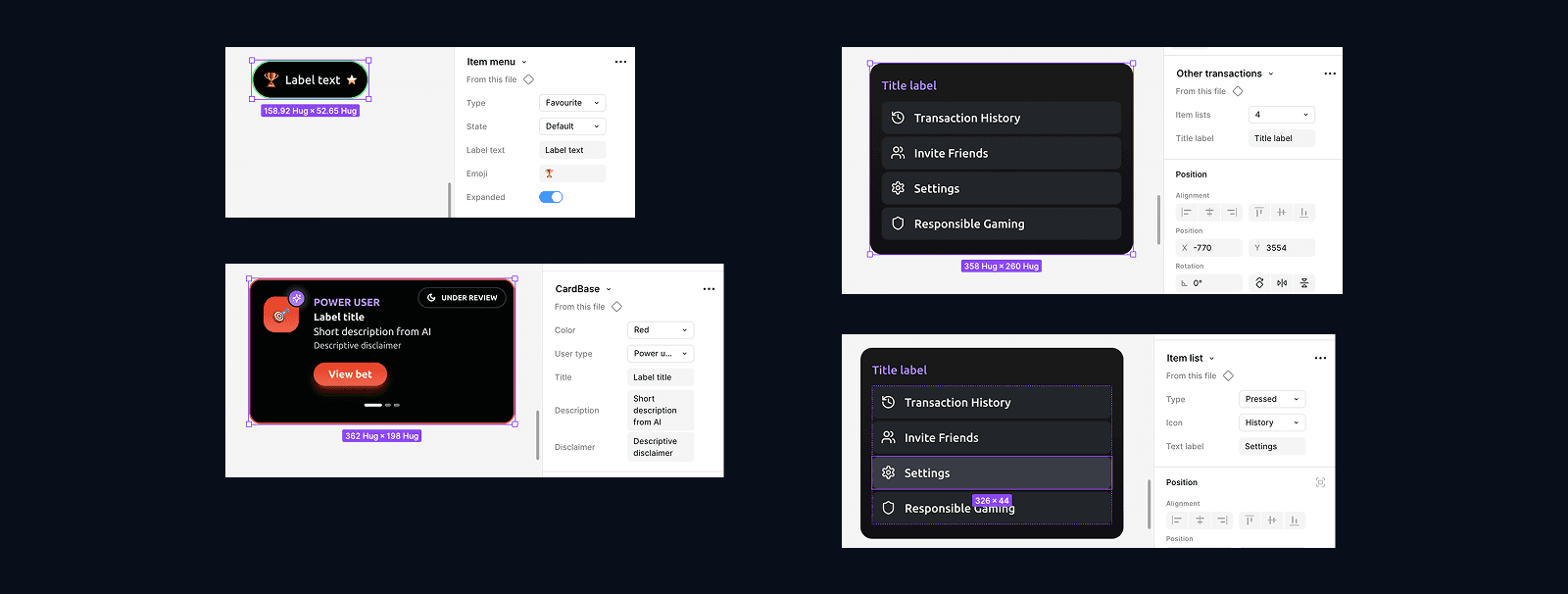
The Figma file was architected to mirror production, not just look like it.
Smart Components
→ AI Recommendation Card
Uses Boolean Properties to toggle between confidence states, data explanations and feedback states — a single component handling multiple contexts without duplication.
→ Dynamics Stats Widget
Uses Variables to switch instantly between 2-way and 3-way odds layouts depending on the sport — no manual override required.
→ Dynamics Stats Widget
Uses Variables to switch instantly between 2-way and 3-way odds layouts depending on the sport —
no manual override required.
Token Architecture
→ A full variable collection
Organised across colour, border, spacing and typography — structured to receive predictive inputs from Data Science and map directly to production code.
Mobile-First Ergonomics
→ Every component designed for one-handed use
The Navigation Bar hides during vertical scroll to maximise usable screen area. The Sticky Menu collapses from labels to icons on scroll — reducing visual noise without losing context.


__
The solution
__
The solution
__
The solution
One homepage. Two realities.
One homepage. Two realities.
The Liquid UI system adapts the entire homepage experience based on user tier — not through different pages, but through a single adaptive layout that evolves over time.
New User (Cold Start)
✓ The dashboard surfaces popular content
and welcome bonuses. The AI acts
conservatively, mapping initial interests
without overwhelming. The focus is
education and first-bet confidence.
✓ The dashboard surfaces popular
content and welcome bonuses. The
AI acts conservatively, mapping initial
interests without overwhelming. The
focus is education and first-bet
confidence.
Power User (High Performance)
✓ The interface transforms. Historical data
analysis makes the homepage surgical —
prioritising specific markets, activating
Cashback and Insights badges, and
surfacing statistical patterns the user
hasn't noticed themselves.
"Hello, Champion! Ready for more wins?"
Win rate: 68.5% · Monthly profit: €1,247 ·
Streak: 8 wins
✓ The interface transforms. Historical
data analysis makes the homepage
surgical — prioritising specific
markets, activating Cashback and
Insights badges, and surfacing
statistical patterns the user
hasn't noticed themselves.
"Hello, Champion! Ready for more
wins?"
Win rate: 68.5% · Monthly profit:
€1,247 · Streak: 8 wins
New User (Cold Start)
✓ The dashboard surfaces popular
content and welcome bonuses. The
AI acts conservatively, mapping initial
interests without overwhelming. The
focus is education and first-bet
confidence.
Power User (High Performance)
✓ The interface transforms. Historical
data analysis makes the homepage
surgical — prioritising specific
markets, activating Cashback and
Insights badges, and surfacing
statistical patterns the user
hasn't noticed themselves.
"Hello, Champion! Ready for more
wins?"
Win rate: 68.5% · Monthly profit:
€1,247 · Streak: 8 wins


__
Prototype
__
Prototype
__
Prototype
See it in motion
The prototype demonstrates four core interaction principles — content filtering, feedback loops,
adaptive layouts and liquid transitions between user tiers.
The prototype demonstrates four core interaction principles — content filtering, feedback loops, adaptive layouts and liquid transitions between user tiers.
The prototype demonstrates four core interaction principles — content filtering, feedback loops, adaptive layouts and liquid transitions between user tiers.
Content Filtering
✓ The Sticky Menu controls the entire homepage state. Selecting "Tennis" instantly filters all content below to that sport only.
Smart Drawer
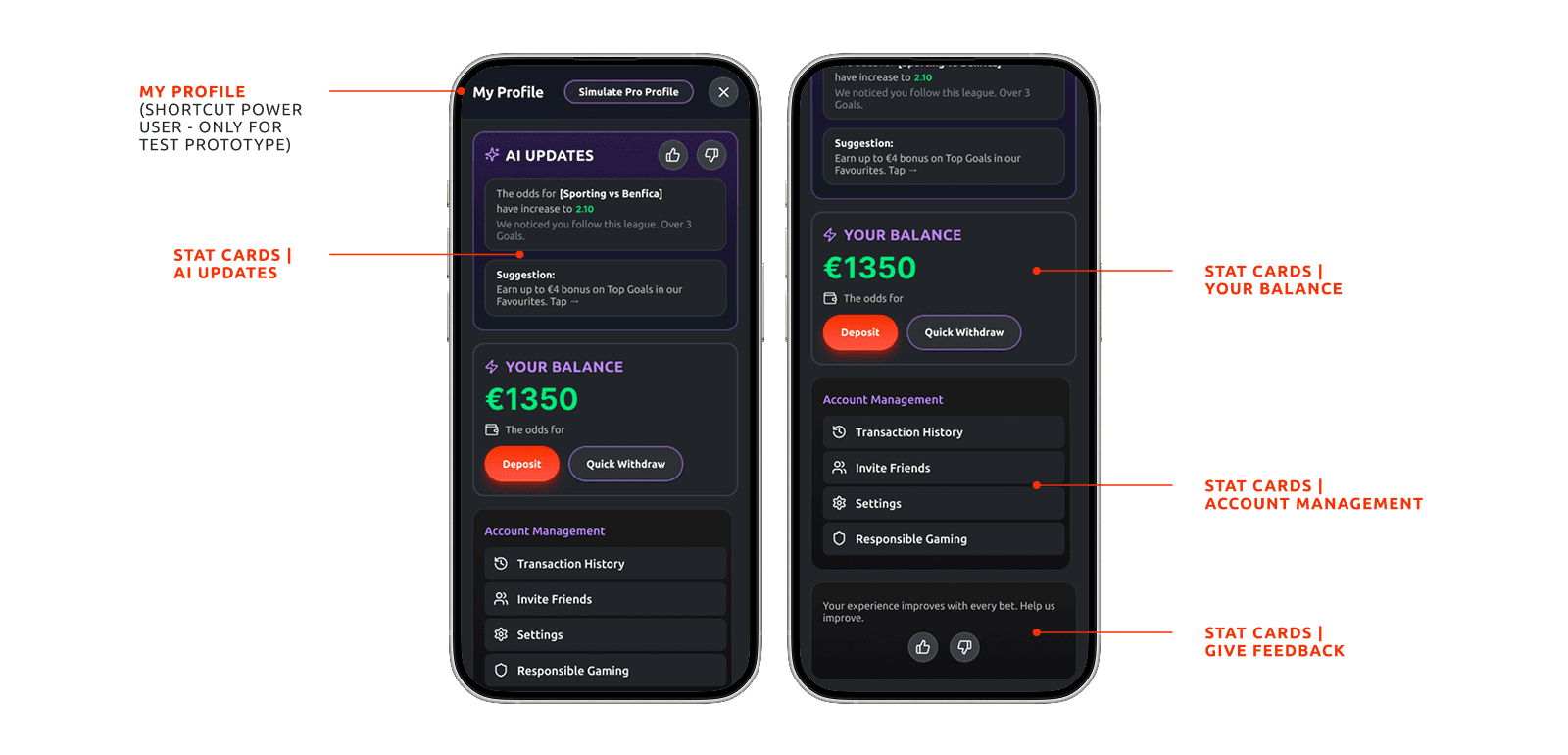
✓ Overlay pattern keeps navigation context intact while surfacing account management, balance and AI updates in a single hub.
Feedback Loops
✓ Like / Dislike buttons on every AI card feed directly back into the recommendation model — closing the loop between user signal and AI refinement.
Liquid Transition
✓ Smart Animate transitions between New User and Power User profiles — demonstrating how the interface evolves without jarring the user experience.
Content Filtering
✓ The Sticky Menu controls the entire homepage state. Selecting "Tennis" instantly filters all content below to that sport only.
Feedback Loops
✓ Like / Dislike buttons on every AI card feed directly back into the recommendation model — closing the loop between user signal and AI refinement.
Smart Drawer
✓ Overlay pattern keeps navigation context intact while surfacing account management, balance and AI updates in a single hub.
Liquid Transition
✓ Smart Animate transitions between New User and Power User profiles — demonstrating how the interface evolves without jarring the user experience.

__
What I learned
__
What I learned
__
What I learned
AI features need a trust layer before they need
an algorithm
The most technically sophisticated part of this project was the simplest to design: the micro-copy. "Based on your 85% win rate in Tennis" is four words of UX writing. But it's the difference between a recommendation users ignore and one they act on.
The real design challenge in AI products isn't the interface — it's building the perception of intelligence. Users don't need to understand how the model works. They need to believe it works for them.
This project also confirmed how Figma Make changes the design process: decisions that previously required full high-fidelity mocks to evaluate can now be tested as interactive hypotheses in a fraction of the time.
Given the one-week part-time timeline, accessibility was partially scoped — touch targets were validated throughout, but font sizes and colour contrast ratios would require a full WCAG audit before any production handoff.
The most technically sophisticated part of this project was the simplest to design:
the micro-copy. "Based on your 85% win rate in Tennis" is four words of UX writing.
But it's the difference between a recommendation users ignore and one they act on.
The real design challenge in AI products isn't the interface — it's building the perception of intelligence. Users don't need to understand how the model works. They need to believe it works for them.
This project also confirmed how Figma Make changes the design process: decisions that previously required full high-fidelity mocks to evaluate can now be tested as interactive hypotheses in a fraction of the time.
Given the one-week part-time timeline, accessibility was partially scoped — touch targets were validated throughout, but font sizes and colour contrast ratios would require a full WCAG audit before any production handoff.
The most technically sophisticated part of this project was the simplest to design: the micro-copy. "Based on your 85% win rate in Tennis" is four words of UX writing. But it's the difference between a recommendation users ignore and one they act on.
The real design challenge in AI products isn't the interface — it's building the perception of intelligence. Users don't need to understand how the model works.
This project also confirmed how Figma Make changes the design process: decisions that previously required full high-fidelity mocks to evaluate can now be tested as interactive hypotheses in a fraction of the time.
Given the one-week part-time timeline, accessibility was partially scoped — touch targets were validated throughout, but font sizes and colour contrast ratios would require a full WCAG audit before any production handoff.
__
Other projects
__
Other projects
__
Other projects
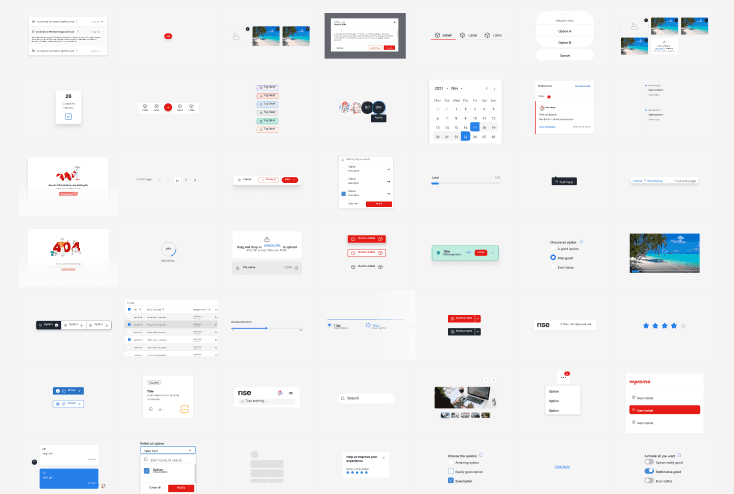
RISE — The system Worten didn't know they needed.
Dozens of product teams. Zero shared foundation. I saw the problem, proposed the solution, and led it for three years. That system is RISE.
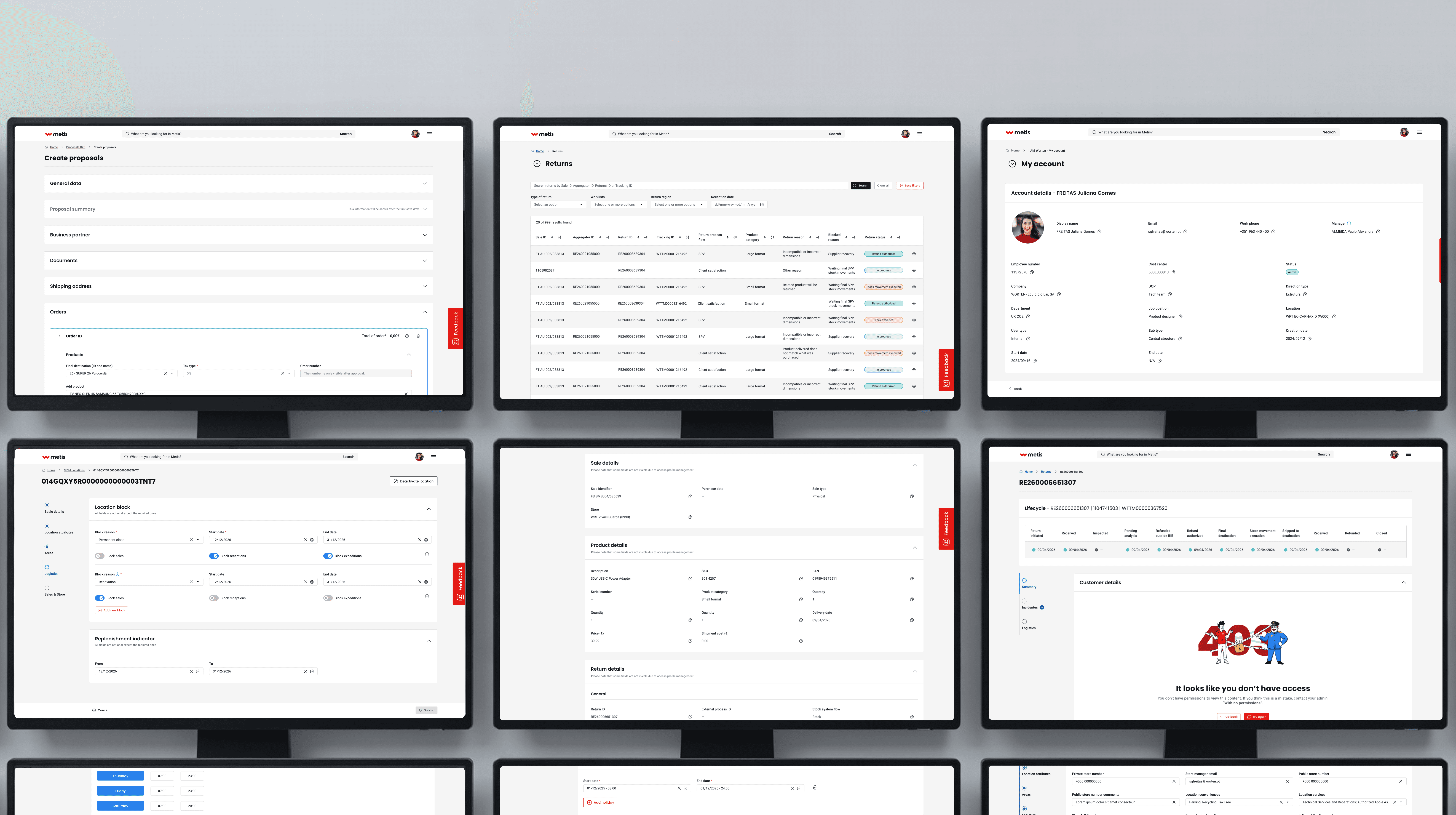
Atlas — Where the system proved itself
Atlas is Worten’s operational backbone — running everything from site configuration to financial reporting. Upgrading it to RISE wasn’t just a visual refresh. It was proof that what we built could hold up under real complexity.
__
Available for select projects & collaborations
If our goals align, I’d love to meet the team.
__
Available for select projects
& collaborations
If our goals align, I’d love to meet the team.
__
Available for select projects & collaborations
If our goals align, I’d love to meet the team.
Copyright 2026 by Juliana Freitas
Copyright 2026 by Juliana Freitas
Copyright 2026 by Juliana Freitas